RamTreeMap
01.07.2026Searching for an easy-to-use tool to show the current RAM usage of a Windows PC in an intuitive way, I found a few options like:
- Windows Task Manager and sort by “Working Set”
- Sysinternals RAMMap
- Sysinternal VMMap
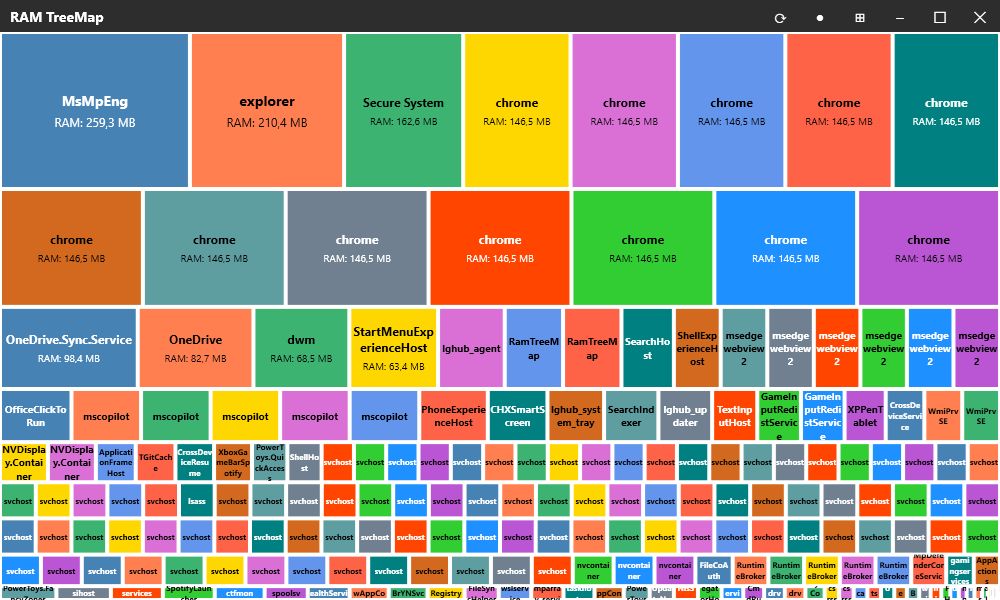
However, none of those showed the data how I wanted it: in a tree map so that the image says it all.
So I created a C# .NET 10 WPF application using calls to the Windows kernel to get such an image. It was an opportunity to evaluate the current abilities of AI tools like Copilot and Gemini inside and outside the IDE.
My key takeaways on using AI for development:
- The Good: AI tools are incredibly helpful for quickly getting a prototype up and running.
- Prompting Tip: I highly recommend creating a single text file that gathers all of your application requirements before you start prompting. Feeding this into the AI keeps the generated code much more focused and aligned with your ultimate goal.
- The Catch: Reviewing the code after generation is essential to avoid running into hidden problems. Furthermore, in my experience building this app, maintenance tasks like code cleanup, deduplication, and architectural tuning are still very much a human task.
I uploaded the tool here in case someone else is looking for something similar: RamTreeMap
Screenshot: